Updating your Company Information
Important Note: You can update all company details across these tabs, except for the Company Code, which is permanently fixed.
Step-by-Step Instructions
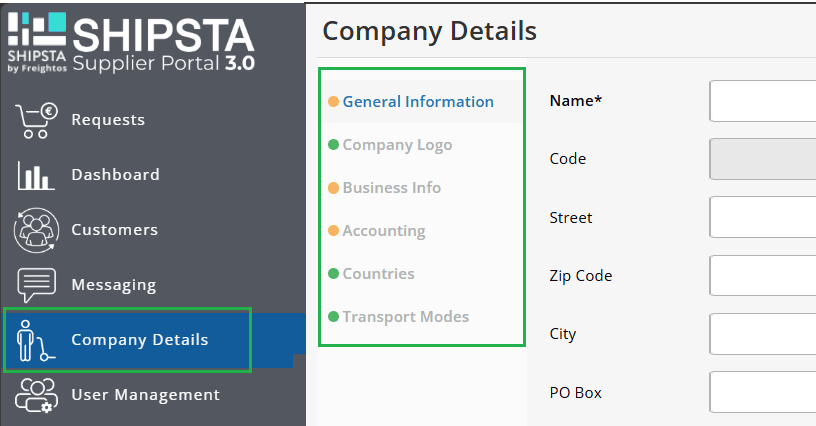
- From the main menu, navigate to Company Details.
- Explore the available tabs to update your information as needed:
- General Information: Update core company details, such as your company name and address.
- Company Logo: Upload or update your official company logo.
- Business Info: Manage operational contact information and default communication settings.
- Accounting: Enter or update billing, tax, and invoicing details.
- Countries: Select the specific countries your company operates in or supports.
- Transport Modes: Choose the modes of transport your business provides (e.g., Road, Sea, Air, Rail).
- Click Save to apply your updates.
Related Articles
How do I edit my company profile or add more users?
You can edit your company profile, and other account information by clicking on your profile on the top right side of the screen and then clicking "Company setting." Click the Edit button to change your company's name, size, country, and city. Once ...
Will the price of my Quote change if my shipment information changes?
If the details you provide when booking your Quote don’t match what the forwarder finds when processing a shipment or if certain details change, your Quote could be adjusted. This is to account for any inconsistencies or modifications Most cost ...
How to download airline rate information
To open this article in a new tab, click here. Using Freightos for Forwarders' What you see tool, you can download airline rate information from the system, selecting to show those that are up-to-date, expiring soon, or that have expired already. ...
How do I dispute an adjustment to my shipment?
To dispute an adjustment charge on your shipment, fill out the Shipment Adjustment Dispute Form on Freightos.com. All the instructions and information you need are on the form. The company will then review the case and take appropriate action. For ...
How can I find out more about the logistics providers on Freightos.com?
Choosing the right logistics provider for your shipments is crucial to ensure a smooth and efficient transportation process. We make it easy by providing detailed information about each of our logistics providers. To learn more about a provider, ...